Asynchronous Programming allows your app to complete time-consuming tasks, such as retrieving an image from the web, or writing some data to a web server, while running other tasks in parallel and responding to the user input. This improves the user experience and the overall quality of your software.
In Dart and Flutter, you can write asynchronous code leveraging Futures, and the async/await pattern: these patterns exist in most modern programming languages, but Flutter also has a very efficient way to build the user interface asynchronously using the FutureBuilder class.
Using a Future
When you write your code, you generally expect your instructions to run sequentially, one line after the other. For instance, let’s say you write the following:
int x = 5; int y = x * 2;
You expect the value of y to be equal to 10 because the instruction int x = 5 completes before the next line. In other words, the second line waits for the first instruction to complete before being executed.
unresponsive until the task is completed
Asynchronous operations do not stop the main line of execution, and therefore they allow the execution of other tasks before completing.
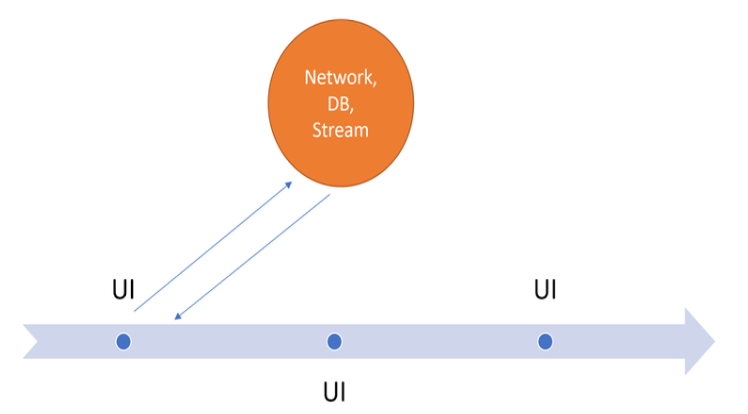
The diagram shows how the main execution line, which deals with the user interface, can call a long-running task asynchronously without stopping to wait for results, and when the long-running task completes, it returns to the main execution line, which can handle it.
Dart is a single-threaded language, but despite this, you can use asynchronous programming patterns to create reactive apps.
to perform asynchronous operations you can use the Future class
Some use cases where an asynchronous approach is recommended include retrieving data from a web service, writing data to a database, finding a device’s coordinates, or reading data from a file on a device. Performing these tasks asynchronously will keep your app responsive.
Some use cases where an asynchronous approach is recommended include retrieving data from a web service, writing data to a database, looking up device coordinates, or reading data from a file on the device. Performing these tasks asynchronously will ensure your application is responsive.