comming soon

comming soon
Flask is a web development framework developed in Python. It is easy to learn and use. Flask is “beginner-friendly” because it does not have boilerplate code or dependencies, which can distract from the primary function of an application.
Some features which make Flask an ideal framework for web application development are:
Flask is known as a micro-framework because it is lightweight and only provides components that are essential. It only provides the necessary components for web development, such as routing, request handling, sessions, and so on. For the other functionalities such as data handling, the developer can write a custom module or use an extension.
XML (Extensible Markup Language) ist eine Auszeichnungssprache, die zur strukturierten Darstellung von Daten verwendet wird. Sie ermöglicht die Erstellung benutzerdefinierter Tags und Hierarchien zur Repräsentation verschiedener Datentypen.
XML wird als standardisiertes Format häufig zur Übertragung und Speicherung von Daten zwischen verschiedenen Systemen oder Plattformen verwendet.
Bausteine von XML: Tags(Elemente), Attribute(Informationen über Elemente) und Text werden in eine hierarchische Struktur kombiniert.
XML-Dokumente können über Erstellung von XML-Schemas validiert werden. Ein XML-Schema definiert die Struktur und die Regeln für die erlaubten Elemente und Attribute im XML-Dokument.
Das Einlesen und Analysieren von XML-Daten wird als „Parsing“ bezeichnet. Mit Hilfe von Bibliotheken wie, z.B. xml.etree.ElementTree und lxml können wir XML-Dateien parsen und auf ihre Inhalte zugreifen.
XSLT (Extensible Stylesheet Language Transformations) ist eine Sprache, mit der XML-Daten in andere Formate transformiert werden können, z.B. in HTML, Text oder andere XML-Strukturen.
XSLT verwendet Stylesheets(Anhäufung von Regeln Elemente in XML), um Transformationen zu definieren.
(-> Bibliotheken wie, z.B. lxml, xml.etree.ElementTree für die Verarbeitung von XSLT-Transformationen)
XML und XSLT werden bei der Webentwicklung, Datenintegration, Generierung von Berichten etc. eingesetzt.
XML erleichtert die Datenkommunikation und -integration zwischen verschiedenen Anwendungen, Plattformen und Systemen, da es eine standardisierte Struktur für den Datenaustausch bietet.
Datenverarbeitung: Mechanismen, um Daten aus verschiedenen Quellen zu lesen, zu schreiben und zu verwalten.
Streams: Große oder kontinuierliche Datenmengen schrittweise zu verarbeiten, ohne alles auf einmal im Speicher zu haben.(->bessere Nutzung von Speicher)
Dateiverarbeitung: Das Öffnen, Lesen, Schreiben und Schließen von Dateien über spezielle Funktionen und Methoden (open(), close() etc.)
Arbeiten mit Dateiinhalten: Das Lesen und Schreiben von Text- und Binärdateien (Textdateien werden in Zeichenketten interpretiert, Binärdateien sind rohe Bytes).
Kontext-Managern: Mit with-Statement Dateien sicher geöffnen und schließen ( -> potenzielle Fehler vermieden)
CSV und JSON für strukturierte Daten: Das Lesen und Schreiben von speziellen Formaten CSV (Comma-Separated Values) und JSON (JavaScript Object Notation)
Rennpferde beim Sportwetten
Aufgabe für Dictionary Comprehensions
Welches Rennpferd war zwischen 1970 und 1980 am längsten aktiv?
Hier sind die berümtsten Rennpferde ausgelistet:
1 | print('Liste berühmter Rennpferde:')<br />race_horses = {<br />'Acatenango': (1993, 2005),<br />'Hoof Hearted': (1973, 1978),<br />'Seabiscuit': (1933, 1947),<br />'Anita Hanjab': (1951, 1969),<br />'Oil Beef Hooked': (1989, 1997),<br />'Ben Timover': (1974, 1986),<br />'Secretariat': (1972, 1989),<br />'Sea the Moon': (2014, 2020)<br />}<br />print('race_horses:', race_horses) |
In this challenge, you need to implement a method that squares passing variables and returns their sum.
Problem statement
Implement a class Point that has three properties and a method. All these attributes (properties and methods) should be public. This problem can be broken down into two tasks:
Task 1
Implement a constructor to initialize the values of three properties: x, y, and z.
Task 2
Implement a method, sqSum(), in the Point class which squares x, y, and z and returns their sum.
Sample properties: 1, 3, 5
Sample method output: 35
Coding exercise
First, take a close look at the slides above and then design a similar step-by-step algorithm before jumping to its implementation.
1 2 3 4 5 6 7 8 | class Point: def __init__(self): self.x = x self.y = y self.z = z def sqSum(self): pass |
1 2 3 4 5 6 7 8 9 10 11 12 13 14 | class Point: def __init__(self, x, y, z): self.x = x self.y = y self.z = z def sqSum(self): a = self.x * self.x b = self.y * self.y c = self.z * self.z return(a + b + c) obj1 = Point(4, 5, 6) print(obj1.sqSum()) |
Explanation
Task 1:
We passed parameters and assigned them to their corresponding properties.
Task 2:
We calculated the squares of the properties by multiplying them with itself and stored them in a variable.
Then, we added all the squared numbers.
Finally, we returned their sum
In this challenge, you need to implement a method that squares passing variables and returns their sum.
Problem statement
In this exercise, you have to calculate a student’s total marks using the concept of Classes.
Problem statement
Implement a class – Student – that has four properties and two methods. All these attributes (properties and methods) should be public. This problem can be broken down into three tasks.
Task 1
Implement a constructor to initialize the values of four properties: name, phy, chem, and bio.
Task 2
Implement a method – totalObtained – in the Student class that calculates total marks of a student.
Sample properties:
1 2 3 4 | name = Mark phy = 80 chem = 90 bio = 40 |
Sample method output: obj1.Total()=210
Task 3
Using the totalObtained method, implement another method, percentage, in the Student class that calculates the percentage of students marks. Assume that the total marks of each subject are 100. The combined marks of three subjects are 300.
The formula for calculating the percentage:

Sample input:
1 2 3 | phy = 80 chem = 90 bio = 40 |
Sample output: 70
Coding exercise
Design a step-by-step algorithm before jumping to the implementation.
1 2 3 4 5 6 7 8 9 | class Student: def __init__(self): pass def totalObtained(self): pass def percentage(self): pass |
1 2 3 4 5 6 7 8 9 10 11 12 | class Student: def __init__(self, name, phy, chem, bio): self.name = name self.phy = phy self.chem = chem self.bio = bio def totalObtained(self): return(self.phy + self.chem + self.bio) def percentage(self): return((self.totalObtained() / 300) * 100) |
Explanation
In line 3 – 6, we have initialized name, phy, chem, and bio as public properties in the class initializer.
In line 9, we have then defined the totalObtained() method. In this method, we added individual marks of all the subjects and returned the sum.
At last in line 12, we defined percentage(). In this method, we called totalObtained() and used its value to calculate the percentage.
300
300
is the total number of marks for a student.
In this exercise, you have to implement a calculator that can perform addition, subtraction, multiplication, and division.
Problem statement
Write a Python class called Calculator by completing the tasks below:
Task 1
Initializer:
Implement an initializer to initialize the values of num1 and num2
Properties:
num1
num2
Task 2
Methods:
add() is a method that returns the sum of num1 and num2.
subtract() is a method that returns the subtraction of num1 from num2.
multiply() is a method that returns the product of num1 and num2.
divide() is a method that returns the division of num2 by num1.
Input:
Pass numbers (integers or floats) in the initializer.
Output:
addition, subtraction, division, and multiplication
Sample input:
1 2 3 4 5 | obj = Calculator(10, 94); obj.add() obj.subtract() obj.multiply() obj.divide() |
Sample method output:
1 2 3 4 | 104 84 940 9.4 |
Coding exercise
Design a step-by-step algorithm before jumping to the implementation.
1 2 3 4 5 6 7 8 9 10 11 12 13 14 15 | class Calculator: def __init__(self): pass def add(self): pass def subtract(self): pass def multiply(self): pass def divide(self): pass |
1 2 3 4 5 6 7 8 9 10 11 12 13 14 15 16 17 18 19 20 21 22 | class Calculator: def __init__(self, num1, num2): self.num1 = num1 self.num2 = num2 def add(self): return (self.num2 + self.num1) def subtract(self): return (self.num2 - self.num1) def multiply(self): return (self.num2 * self.num1) def divide(self): return (self.num2 / self.num1) demo1 = Calculator(10, 94) print("Addition:", demo1.add()) print("Subtraction:", demo1.subtract()) print("Mutliplication:", demo1.multiply()) print("Division:", demo1.divide()) |
Explanation
We have implemented the Calculator class, which has the two properties, num1 and num2.
In the initializer, at line 3 – 4, we have initialized both properties, num1 and num2.
In line 7, we implemented add(), a method that returns the sum, num1 + num2, of both properties.
In line 10, we implemented subtract(), a method that returns the subtraction of num1 from num2.
In line 13, we implemented multiply(), a method that returns the product, num2 x num1, of both properties.
In line 16, we implemented divide(), a method that returns the division of num2 by num1.
def add(p1, p2):

    sum = p1 + p2

    return sum


print(add(2, 4))
Die prozedurale Programmierung ist ein Programmierparadigma unter vielen anderen.
Bei der prozeduralen Programmierung wird ein Programm in kleinere Teile, sogenannte Methoden, unterteilt. Diese Methoden sind die grundlegenden Einheiten , die zum Erstellen eines Programms verwendet werden. Einer der Hauptvorteile der prozeduralen Programmierung ist die Wiederverwendbarkeit des Codes. Allerdings wird die Umsetzung eines komplexen realen Szenarios zu einer schwierigen und umständlichen Aufgabe.
widget.place(relx = 0.5, rely = 0.5, anchor = CENTER)
The Place geometry manager is the simplest of the three general geometry managers provided in Tkinter. It allows you explicitly set the position and size of a window, either in absolute terms, or relative to another window. You can access the place manager through the place() method which is available for all standard widgets. It is usually not a good idea to use place() for ordinary window and dialog layouts; its simply too much work to get things working as they should. Use the pack() or grid() managers for such purposes.
Note : place() method can be used with grid() method as well as with pack() method.
When we use pack() or grid() managers, then it is very easy to put two different widgets separate to each other but putting one of them inside other is a bit difficult. But this can easily be achieved by place() method. In place() method, we can use in_ option to put one widget inside other.
1 2 3 4 5 6 7 8 9 | a=5 b=3 c=a+b print(f"Die Aufgabe: {a} + {b}") print("Bitte Lösungsvorschlag eingeben:") z = input() zahl = int(z) print("Ihre Eingabe:", z) print("Das Ergebnis:", c) |
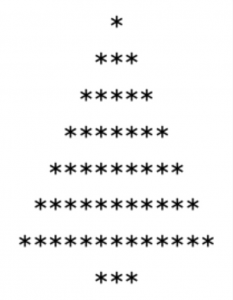
Schreibe ein Programm, das die folgenden Muster in der Konsole ausgibt:
1. Python installieren
2. Erste Schritte
    2.1 Python an der Eingabeaufforderung
    2.2 Ein erstes Programm erstellen
    2.3 Das Programm ausführen
3. Die Programmiersprache Python
     3.1 Variablen und Operatoren
     3.2 Verzweigungen
     3.3 Schleifen
     3.4 Funktionen
     3.5 Datentypen
     3.6 Fehlerbehandlung in Python-Programmen
4. Objektorientierte Programmierung
     4.1 Klassen
     4.2 Konstruktoren, Destruktoren
     4.3 Methoden
     4.4 Vererbung
5. Benutzeroberflächen mit "Tkinter"
Verzweigungen
Einseitige Verzweigung
Zeiseitige Verzweigung (if…else)
Fallunterscheidung (if…elif…else)
Bedingungen
Boolesche Werte
Boolesche Operatoren
Vergleichsketten
Bedingte Wiederholung – while
Endloswiederholung
Iteratoren for
Wiederholungen mit range()
Definition
Syntax
Funktionsnamen
Typangabe
Funktionsannotation
Parameter / Argumente
Optionale und voreingestellte (Default) Parameter
Funktion testen
Prozeduren
return-Anweisung
Positions- und Schlüßelwortargumente
Calltips
Docstring
Signatur
Build-In Funktionen
Globale und lokale Variablen
Rekursion
Beispiel:

Zur Umwandlung des gegebenen Texts durchlaufen wir diesen zeichenweise von vorne nach hinten. Das Ergebnis sammeln wir in einem neuen String. Finden wir einen Vokal, fügen wir die übergebene Ersatzzeichenfolge ein, ansonsten den Konsonanten (bzw. genauer das Originalzeichen, was auch eine Ziffer oder ein Satzzeichen sein könnte):
1 2 3 4 5 6 7 8 | def join(values, delimiter): result = "" for i, current_value in enumerate(values): result += current_value # Kein Trenner nach letztem Vorkommen if i < len(values) - 1: result += delimiter return result |
Python-Shortcut Das Zusammenfügen von Strings lässt sich mit der geeigneten Funktion join()schön kompakt, verständlich und ohne Spezialbehandlung schreiben:
1 | result = delimiter.join(values) |